The Official Second Brain Notion Template

Your Shortcut to Thinking Better, Creating More, and Finally Trusting Your System
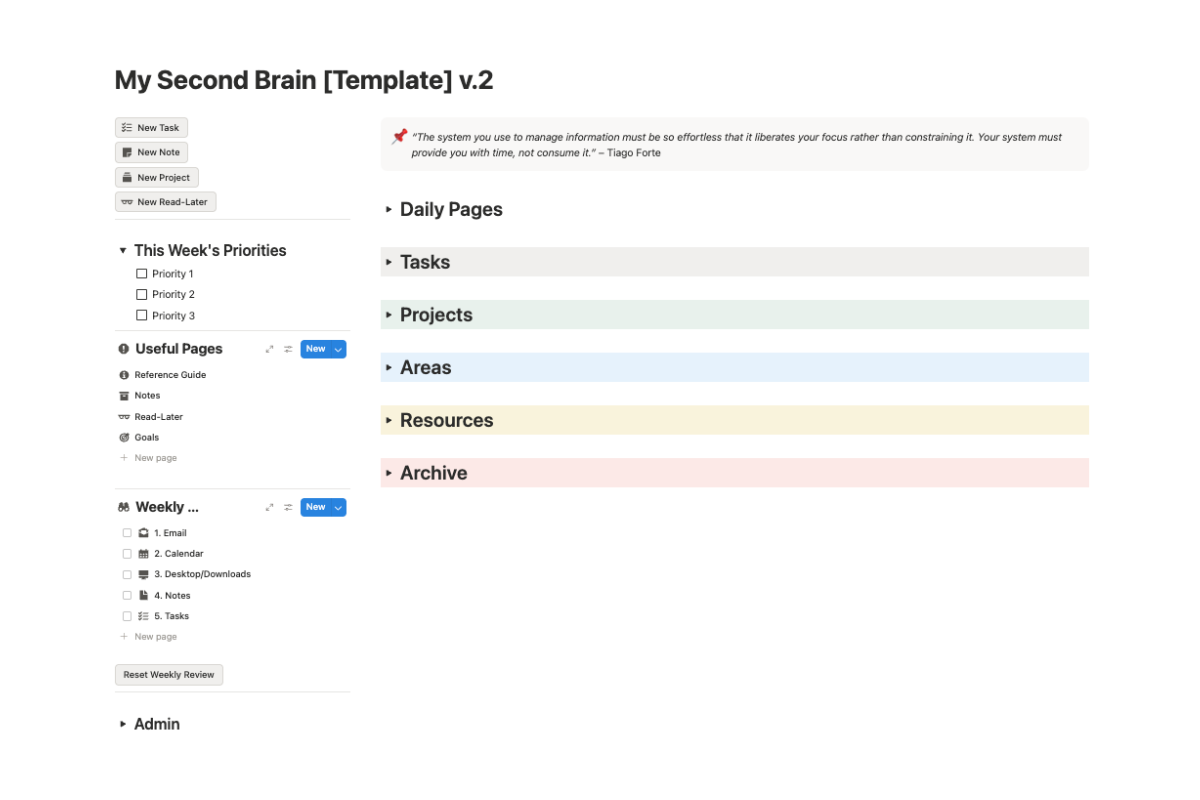
The Official Second Brain Notion Template

What's in the template

This template takes everything we teach in Building a Second Brain and makes it effortless to apply inside Notion.

The PARA Method Structure: Organize everything into Projects, Areas, Resources, and Archive, so you always know where things go.

Quick Capture Inbox: Save ideas, notes, and links in seconds, then process them when you’re ready.

Simple Task Management: Stay on top of your priorities with a lightweight system for managing tasks and projects—without unnecessary complexity.

Personal Knowledge Hub: Keep your best ideas at your fingertips by organizing book notes, research, and resources in one structured place.

Habit Tracking & Journaling: Use the built-in daily pages to reflect on your day and document your growth, while tracking progress on your most important habits over time.

Weekly Review Checklist: Reset, reflect, and plan for the week ahead with a Weekly Review made easy.

Read-Later Functionality: Save all the interesting videos/articles/podcasts you want to consume later.

Mobile-Optimized View: Access your Second Brain on the go on the Notion mobile app

Built-In Onboarding Steps: The template teaches you as you go. You'll have your Second Brain ready in under an hour.

What you'll also get

Comprehensive walkthrough videos and migration guide

Direct support from the BASB team

Lifetime updates (free forever)

Access to the BASB community

What our users are saying

"This Notion template has helped me organize my notes seamlessly using the PARA Method. It has removed all the friction and pain points of using Notion as a Second Brain. I highly recommend this template for anyone looking to use Notion as a Second Brain. Very user friendly and easy to navigate.”

– Muhammad Khurram

“The Forte Labs team has outdone themselves once again. The BASB template for Notion is a simple, intuitive framework for you to get started taking action and move towards JOMO instead of FOMO. I highly recommend you trying it out.”

– Ethan Miller

If you’ve ever struggled to keep your digital life in order…

If you’ve tried to build a Second Brain but found yourself stuck in setup mode…

This is the shortcut you’ve been looking for.

FAQs

Is this template beginner-friendly? Will it teach me how to use Notion?

Yes, it’s beginner-friendly. The walkthrough videos guide you through setup and customization step by step, and the built-in onboarding teaches you as you go.
That said, teaching the very basics of Notion (like how to navigate the platform, create new pages, or use databases) is beyond the scope of this template. If you're brand new to Notion, we've included links to official Notion resources to help you get started.

How long does it take to set up?

The built-in onboarding guides you through 13 short setup steps — you'll have your Second Brain ready in under an hour.

What if I already have a Notion setup? How do I migrate into this template?

We provide guidance in the walkthrough videos on different options for bringing in your existing notes and tasks. Whether you're migrating from another Notion setup or a different tool entirely, we'll walk you through how to do it.

What if I've never used the PARA Method before?

No problem at all. The template is built to help you apply PARA effortlessly, even if you're brand new to the system.
The walkthrough videos explain how it works, and the built-in easy reference guide helps you understand where things go.

Does this work on the free version of Notion?

Yes. You don't need Notion's paid plan. This template works perfectly on the free version.

What kind of support do I get?

When you purchase the template, you get access to our Circle community where you can ask questions and get help from the BASB team.
We've already answered hundreds of questions and helped many people optimize their setup. You're not alone in this.

Can I customize it for my workflow? Does it work for both work and personal projects?

Yes to both. The template is fully adaptable — keep it simple or tweak it to match your unique needs. It's flexible enough to manage both personal and professional projects, notes, and resources all in one place.

Will I get updates if you improve the template?

Yes. Your purchase includes lifetime updates. Any future improvements or refinements will be available to you at no extra cost.

Do you offer discounts?

We're dedicated to making the template accessible to a diverse range of people.
If you're affiliated with a non-profit, NGO, educational institution, or are a faculty member, please reach out to support@fortelabs.com to inquire about a discount.
We also support Purchasing Power Parity Pricing. Based on your location, you might qualify for a reduced price — you'll automatically see a banner with a discount code. (Make sure to disable any VPN since this will block the banner from showing.)

What’s your refund policy?

We do not offer refunds for the Second Brain Notion template. All sales are final.

Still have questions?

We're here to help. Reach out to support@fortelabs.com and we'll get back to you quickly.

Contact Information

Billing Information

Gifting Options

Coupon

[[coupon_message.text]] [[cart_coupon.text]]

Payment Methods

PayPal selected.

After submitting, you will be redirected to the PayPal website to fill out your payment information. You will be redirected back to our site once the payment is completed.

Apple Pay selected.

Another step will appear to securely submit your payment information.

Google Pay selected.

Another step will appear to securely submit your payment information.

Subtotal:
[[checkoutContext.order.invoice.subtotal | currency]]
Tax:
[[checkoutContext.order.invoice.tax | currency]]
Shipping:
[[checkoutContext.order.invoice.shipping | currency]]
Discounts:
-[[checkoutContext.order.invoice.discount | currency]]
Total:
[[checkoutContext.order.invoice.total | currency]] (USD)
[[subscriptionsByProductId[checkoutContext.order.invoice.items[0].product_id].plan_description]]